Showing posts with label Software. Show all posts

Tuesday, April 5, 2011

How to add the Marine Aquarium 3 in Screen Saver

By agus47-jatiblogger

Marine Aquarium 3 is a sreen saver is very interesting, because it can display an artificial aquarium close to the original.


In a marine aquarium this 3 we can also add the number of fish and fish species that we want into the software.


As for how to add 3 as a marine aquarium sreen saver into your computer is as follows:

Step 1:
  • Download Marine Aquarium 3
  • Extract from RAR to C:\WINDOWS\system32

Step 2:
  • Go to Desktop
  • Right click, Properties, Sceen Saver
  • Select Marine Aquarium 3 in the box sceen saver and click ok
  • Click Apply

Now if your computer is in a resting position, you can enjoy the marine aquarium 3 as the release tired.


Download (Marine Aquarium 3)

Thursday, October 28, 2010

Capture Web Page Scrolling Screen

I Have found a Firefox Add ons to Capture Web Page Scrolling Screen for long time, but a tragedy happen and i must reinstall my operating system and forgot it's name.

What the hell is the name. I search on google and cannot found the add ons because it was less popular in search engine.

A day later i remember the name and suddenly i install it again. The name is ScreenGrab. it was popular add ons to Capture Web Page Screen and it can be doing task like Capture Web Page Scrolling Screen.

Here it is the result of ScreenGrab


Saturday, July 10, 2010

MiniLyrics Program Karaoke untuk Winamp Anda

Ada MiniLyrics Sebuah Program Karaoke dan Lyrics / Lirik untuk Winamp Anda, Sebenarnya MiniLyrics Program Karaoke yang berbaya untuk Winamp Anda. Programnya sangat menarik.


MiniLyrics untuk Winamp dapat anda download di website resminya http://www.winamp.com/plugin/minilyrics/143654 jika anda tertarik denga n plugin ini anda dapat membelinya.

Review dari beberapa pengguna sangat positif.

Nice program - This plug-in is really great. Lyrics are synchronized so you can follow it easily. Even you minimize the winamp you can read the lyrics on the top of screen.I suggest everyone to use this plug-in :)

MiniLyrics is an amazing lyrics plug-in Winamp. It will download and display lyrics automatically, You can follow along with the artist and catch every word. MiniLyrics can save lyrics in mp3 files, you can view lyrics on iPod touch or iPhone. Its lyrics database expands every day.


Untuk Settingan MiniLyrics Sebaiknya kita gunakan Static Text Style

Sunday, November 22, 2009

Mengecek Sisa Fair Use Packet Telkomsel Flash Unlimited Bulanan dengan Modem Huawei E220

Mengecek Sisa Fair Use Packet Telkomsel Flash Unlimited Bulanan adalah satu cara terbaik untuk penghematan pengguanaan Quota, apalagi jika kita ingin berhemat dan selalu dalam range Quota dan kecepatan yang diperoleh bagus.

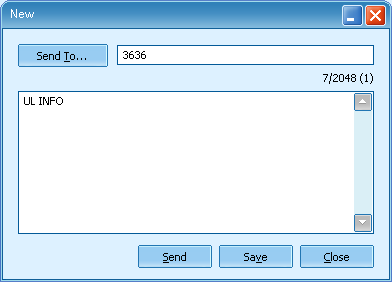
Caranya adalah dengan menggunakan perintah
UL
< spasi > INFO

dan mengirimkannya ke 3636 dari kartu Telkomsel Flash anda.

Jika menggunakan Modem tentunya lebih mudah lagi.
1. Buka Software Modem yang terkait SMS / Message

Sisa Fair Use, Packet Telkomsel Flash, Unlimited Bulanan, SMS Modem Huawei E220
2. New Message and Send
Sisa Fair Use, Packet Telkomsel Flash, Unlimited Bulanan, SMS Modem Huawei E220
3. View
Sisa Fair Use, Packet Telkomsel Flash, Unlimited Bulanan, SMS Modem Huawei E220

Sisa Fair Use, Packet Telkomsel Flash, Unlimited Bulanan, SMS Modem Huawei E220

Thursday, September 10, 2009

Windows Firewall Dead!!! COMODO Firewall Can Protect my Computer !!!

Broken Firewall
If Your Windows Firewall is Broken, a simple way to firewall it from the Internet is using Firewall Software. Usually we need to pay for a Firewall Software. But a Great free firewall software COMODO Security is the answer..

COMODO Internet and antivirus security is a great free software.
COMODO Antivirus and FirewallFrom the Image above we can see COMODO as Antivirus and Firewall. It can shows what kind of program that using almost of the traffic. If Program that using traffict seems to be strange, we can turn it off.

Wednesday, September 2, 2009

Menginstall Yahoo Messenger Secara Offline


Install Yahoo Mesenger dari Link http://messenger.yahoo.com/download/ maka akan sangat lambat (untuk koneksi internet lambat dan sedang). Belum lagi koneksi putus.

Sebenarnya ada link yang langsung bisa mendownload Installer Ym secara Full Installer (Anda bisa menginstall secara Offline). Silakan download dari link download. Dijamin dengan kecepatan 7-10 KBps dalam waktu kurang dari 20 menit anda sudah memiliki file utuh untuk instalasi Yahoo Messenger 9 di komputer anda.

DOWNLOAD:

Yahoo Messenger 9 Full Offline installer (final version).


Versi ini juga stabil lho...

Monday, August 3, 2009

Zac Browser Internet Solution for Autistic Children

By Agus47-jatiblogger

Currently, Computer and Technology will discuss about Internet Solution for Autistic Children. Internet technology is already very advanced, the few that we can not find on the internet. Internet is reaching out to all the people, even children. Now, for children with autism, and autism spectrum disorders such as Asperger syndrome, pervasive developmental disorders (PDD), and PDD-NOS can also use the internet with the browser in a special for them.


Zac Browser is the zone that will permit your child to interact directly with games (a LOT of games) and activities (focused on MANY interests) that cater specifically to kids who display the characteristics of autism spectrum disorders, like impairments in social interaction, impairments in communication, restricted interests and repetitive behavior. ZAC has been an effective tool for kids with low, medium and high functioning autism.


Zac Browser is very useful for teachers, especially for children's autism teachers are also parents at home. Zac browser can also be used for other normal children (because the system is to play while learning) and it is very easy to run for the children (of course in the supervision of his parents).


For those who have children, you can try the download here for free.


Wednesday, July 22, 2009

Knowing Blog Dofollow with NoDoFollow 1.1

By. Agus47-jatiblogger

Currently, Computer and Technology will discuss about Knowing Blog Dofollow with NoDoFollow 1.1.
After you change your blog for Nofollow become Dofollow, you will surely find another blog to share the backlink. But, to know a blog is Dofollow or not, sometimes we have to find out first with a view page source on the blog, or looking for a blog who use Dofollow banner.
For mozilla firefox users, there is easier way to install the tools called NoDoFollow 1.1, which we will make it easier to know a blog dofollow or not.

How do I install NoDoFollow 1.1? Follow the steps below:
  1. Open your mozilla browser.
  2. Click Tools.
  3. Click Add-ons.
  4. Click Get Add-ons, and write in the search field with the “NoDoFollow 1.1”, then Enter / click the magnifier image.
  5. After NoDoFollow 1.1 is found, click Add to firefox.  
  6. After the countdown finished, click Install now.
  7. Click Restart firefox.
  8. Now you close the window Add-ons, and start using this toll.
How do I use the tools NoDoFollow 1.1? Very easy, follow these steps:
  1. Right click on your mouse.
  2. Then click NoDoFollow to activate it. (Then all you have any posts Dofollow links will change the color to be blue and the Nofollow links will change in red).
  3. Click again NoDoFollow to none activate this tool.

Or you can download here ( NoDoFollow 1.1 ).

Easy is not it? Happy to try....

Tuesday, July 14, 2009

Bend Effect in Nero Cover Designer

Nero Cover Designer is great tools to make CD or DVD Covers. Below is simple tutorial to make a bend effect of Font in CD or DVD. To make it easy to understand, Please look at the result in Figure 1 below.

Figure 1.

How can we make bend effect of the Font in Nero Cover Designer?. Just right click font on workspace then Bend! It will bend automatically. We Just need to configure the position.


Figure 2. Bend.

That's All and Finish.


Friday, June 26, 2009

Format Factory 1.70

By. agus47-Jatiblogger

Currently, Computer and Technology will discuss about Format Factory 1.70. This software can convert all video to all mobile device, mp4, 3gp, avi , wmv, mpg, vob, flv, swf, and mov.
Convert audio to mp3, wma, flac, aac, mmf, amr, m4a, m4r, ogg, mp2, and wav.
Convert picture to jpg, png, ico, bmp, gif, tif, pcx, and tga.
ROM divide\DVD\CD\ISO for convert DVD to video file, CD to audio file, DVD/CD to ISO/CSO and ISO to CSO.
And for all of this service you not need to pay. Yes all is free and no limit.

How to use:
Just install the software.

For convert video file chose video and follow the step:

Step 1:
Click icon all to AVI or what you like use for convert to what type you want.


Step 2:
Click add file for chose your file video you want to convert.(If you want setting the file, you can chose output setting then if you finish you can go to step 3)

Step 3:
Click OK.


 Step 4:
Click start.

Step 5:
Wait until your file has finished in the convert.


Step 6:
Click out put folder to retrieve the file which has been convert in FFoutput.

This step also applies to convert audio and picture.


Monday, March 23, 2009

Downloading High Quality Movie (DVDRip) Using Torrent Client


Many of people enjoy watching Latest Hollywod or Warner Brothers and another Film Production in cinemas, but some people can download the high quality videos / film using Torrent Client such UTorrent or BitTorrent.

Some torrent that provide high Quality latest best film DVDRip are AXXO, FXG. etc. The torrent announcer by AXXO , FXG, etc use their name in the filename. Beside provide the film in AVI format, they ussualy include the subtitle in one solution download.

How you can do the download using torrent client such as
UTorrent or BitTorrent..? There are simple way to do this.

First, you must have a torrent client. In example here I'm using
UTorrent1.8
1. Search with keywords AXXO or FXG or DVDRIP in thepiratebay.org or
mininova .org
2. Click One of the File Link
3. Click Download this Torrent
4. Open the torrent with Uttorent Client
5. Wait until the download Finish


Usually higher connection speed good for the download. Please be patient wait the film finish to download.

Saturday, March 14, 2009

md5sum software

The md5sum is designed to verify data integrity using the MD5 (Message-Digest algorithm 5) 128-bit cryptographic hash. MD5 hashes used properly can confirm both file integrity and authenticity.

In terms of integrity, an MD5 hash comparison detects changes in files that would cause errors. The possibility of changes (errors) is proportional to the size of the file; the possibility of errors increase as the file becomes larger. It is a very good idea to run an MD5 hash comparison check when you have a file like an operating system install CD that has to be 100% correct.


Download md5sum here for windows

and also portable version (USB Flash)

PortableWinmd5sum

Thursday, February 26, 2009

Free Anti Virus Software (Review)

Ever since the computer became a common place item in every household all over the world, antivirus software has become a necessity. Of course with such increasing demands for it, many software making companies are taking advantage and developing more and more antivirus engines for use in any electronic device that might need it. Choosing one that is suited to your needs is not easy due to the fact that there are plenty of options and all claim to be the best. However, for those who are on a budget or are looking for something easy on the pockets, free antivirus software is their only option. Even then, the choices are quite numerous. Your best bet in finding the best free antivirus software is to read free antivirus software reviews. I know, I know, you're thinking that these antivirus softwares must be no good when compared to the ones that you have to purchase. In a way, you are correct. However, many of these free antivirus softwares actually provide great protection.

Here's some free antivirus software reviews for you, based on the comments of people who have tried it for themselves.

1. AOL Active Virus Shield (Kaspersky Antivirus)

- This is an antivirus which was based on the leading paid antivirus program, the Kaspersky Antivirus Ver.6. It offers the best detection rates and updates itself frequently just as one would expect from Kaspersky products.

2. Avira AntiVir Personal Edition

- Installation was painless and the user interface has been improved since the release of the last version. The options are displayed in a very organized way, making it easy for the user to try it all as well as to switch to the "expert mode".

3. AVG Antivirus Free Edition

- Considered by many to be the most configurable of all the free antivirus softwares available in the internet. Though the variety of the choices might confuse first time users, it is still arguably the best when it comes to protection for your pc.

4. eTrust EZ Antivirus

- Although not completely free as it is only available for a 1 year trial from the Computer Associates site, it is still among the easiest to install as well as to maintain among all the antivirus softwares. The user interface is very easy to understand and it also provides the user with the necessary information and even links out to other resources in the event that it is necessary.

5. Avast 4 Home Edition

- This antivirus is among the most rich in terms of features when compared to other free antivirus software. It monitors many of the overlooked potential virus entry points such as through your mail and through instant messengers. It is also very configurable and would provide the user with many great features such as the antivirus screensaver which would run the virus scan while your screensaver is active.

So there you have it folks, five of the free antivirus software reviews that would help you in choosing free antivirus software that would meet all your standards as well as your computer's needs. Remember, just because its free it doesn't mean they are no good.

Friday, November 7, 2008

How To Burning DVDs With Symatech Free Software?

There is no shortage of free DVD software on the Net, but most of them churn out poor quality discs that just waste your money and time. If you are looking for reliable DVD software, Symatech has a wide array of free products that will cater to your needs.

ImgBurn

With their large storage capacity, DVDs have become the choice medium for backing up important files, pictures or making music CDs. With imagBurn from Symatech, the entire process is simplified and streamlined, making it a cinch to burn DVD files.

The way imgBurn works is by simply reading the info on the disk, and then burning it on the DVD. Before it does so, it performs a data check to ensure that none of the files or disc is corrupt. It can work with DVD, DVD-HD and CDs, and runs on all Windows personal computers.

SoThinkMovie

Now it is easier than ever to make your very own home movie, thanks to Symatech's SoThinkMovie DVD Movie Maker. Unlike other programs that are difficult to use, SothinkMovie automatically creates the file structure, so all you have to do is to set it up for writing on the DVD. It is the perfect complement to imgBurn as it is all just a matter of point and click.

The AVS Disc Creator

The AVS Disc Creator is a free CD/DVD Burner but heads and shoulders above the rest. First of all, it supports a very wide array of discs: DVD-RAM, CD, CD-RW, DVD+R, DVD-R, Dual Layer DVD and Blu Ray discs. In fact it is the first freeware program to support the Blu-Ray. While there may be other software that support the Blu-Ray format, most of them require you to pay to use them. The AVS Disc Creator, on the other hand, is completely free.

CDBurner XP Pro

For users of Windows XP, the CDBurner XP Pro was specially designed by Symatech for your use. It has support for CD-R, CD-RW, DVD-R, DVD-RW and DVD+R/RW. Its main purpose is to burn music files onto CDs, but it can also be used to create ISO files. It is highly customizable and easy to use as the interface was designed with new users in mind.

Deepburner Free Version

The DeepBurner Free Version is one of the best recorders available for Windows XP and Vista. It has support for CDR, CDRW, and DVD-R, /RW and DVD+R/RW. Not only is it intuitive, easy for even beginners to use, but the burning process is very fast, and the quality of the discs it churns out are top of the line, without the usual clicks and pops that you have come to associate with free DVD burning software.

Final Burner Free

Final Burner Free from Symatech consists of several programs and applications that will make it easier for anyone to make customized CDs and DVDs. Currently the software supports DVD-R/RW, DVD+R/RW, DVD-DL, and CD-R/RW. As with all other products form Symatech, it removes the mystery from burning and recording files, making it an effortless task for all types of computer users.

Tuesday, September 23, 2008

Do You Want to Get More Traffic For Your Website? Here the Answer

What is Website Promotion Services and why is it necessary?

Website Promotion services help in your Web business by drawing a target on your website. To the targeted traffic, your site must be search engine friendly. You have to ensure that people are aware of your existence, and for that you need to advertise your site.

Website Promotion Services include professional engineers, edit the Web pages prior to submission. They enrich the Web sites with specific and relevant keywords, it more user-friendly. Once the site is optimized, it retains its high rank in the search for a fairly long time. For the purposes of promoting the site, website promotion Services are indispensable.

What is the function of website promotion service?

Evaluation and analysis of the site: There are many functions of a website promotion service. It helps when evaluating your site by a group of experts SEO by researching the exact keywords and analyze competition in the market.

Content development and SEO copywriting: The Website Promotion Services are also involved in the development of content and SEO copywriting. They believe guide your site on the principle of search engines and directories. Individual opinions updates are available for the respective customers online.

Availability of meta tags: For the purposes of faster indexing of search, and specific optimized meta tags. This meta-tags are then analyzed and optimized. Meta tags are enormously helpful for the purposes of the optimization, they are important factors in finding your site.

Finding the broken links, spelling check and correct HTML code errors: The website promotion service helps in assessing the site, so that an invalid link, has been overlooked will be processed immediately. It also checks spelling errors and HTML code errors. The relevant keywords must be frequently used in the text of the content. The Website Promotion Service Operations relevant keywords for attracting traffic.

Link Exchange: Another important function of Website Promotion Company is Link Exchange. It is a process of exchange of traffic data for mutual benefit. The URL's of websites are together, so that the search will be easier for the user and the two websites will be of mutual benefit by sharing the traffic.

Their growing popularity: The popularity of your site increased by the help of professional changes; your site to attract large traffic and get a high rank in the first few pages of search engines such as Google, Ask.com, MSN, Yahoo and AOL.


http://www.bullsai.com/


Adobe Photoshop - Great Features from Adobe Photoshop

Adobe Photoshop is an image-editing software. You can edit and manipulate images in a snap with this powerful software. Whether you are a graphic designer, web developer or a photographer, this is a tool that can certainly help you do the job with less time and effort.

Adobe Photoshop is the leading graphics application, which in the digital imaging, Web graphics, prints and other multimedia requirement. Photoshop is widely used by millions of graphic artists, Web designers, photographers, as well as ordinary people. Because of the popularity of the software, it was considered an industry-standard print.

Most likely, posters, magazine covers, book covers, brochures and ads were created or edited with Photoshop. With the powerful tools that Photoshop offers, there are a lot of features that can be used to create the most complex digital art in a children's game.

One of the great features of Photoshop is that it consists of a user-friendly interface that is very easy to navigate. Tools are organized into groups of pallets, which you can customize to your preference workday. It also comes with keyboard shortcuts that you can use to quickly apply commands or one-off or a group of tools.

In addition, Photoshop comes with a sub-program called Adobe ImageReady. This program is added in principle for the creation and graphics is an enhanced Web-design purposes greatly reduce the size of the file in a particular Web site to load faster. GIF files can be reduced as small as 10 to 50% with its compression capabilities. The software is also capable of the graphics or animated GIF. With Adobe ImageReady, you can design interactive JavaScript rollover without the need of writing any programming code. Simply slice the image and link rollovers and different variations of the discs.

All products from Adobe Systems support layer effects. When you work with Photoshop and ImageReady, you can easily effects on an image or a text such as drop shadow, inner and outer bevels and other effects of stratification. A great advantage of working with layers is that the original state to manipulate an image, while another version of it by another layer. You can have as many layers as you want depending on your needs. These layers are independent of each other, which means that if you have a layer, for example, a layer of text, it has no influence on other levels.

Photo editing or photo manipulation is a difficult task without the right tool. But with the use of Photoshop, you can simply insert a photo in less time and effort. Photoshop provides powerful tools that can be used to photo-editing tasks.

You can resize and crop images, without compromising the quality of the image. Also, you can easily remove the background with an eraser tool. With Adobe Photoshop, it is easy to precise parts of an image with the use of the wand and lasso tools. The software also comes with tools such as brightness and contrast, color balance, hue and saturation levels, curves, and many more, are useful in improving or changing the color of an image.

The software comes with a variety of built-in plug-ins can be used to variations on your speech. Some of these plug-ins are custom brushes, filters, effects, and much more.

Adobe Photoshop is integrated with other software from Adobe Systems. Photoshop shares the same user interface as Adobe Illustrator, Adobe InDesign, Adobe Premiere and Adobe After Effects. With the integration, you can seamlessly work and produce great results.

This software also has the ability to use color models such as Lab, RGB, CMYK, binary bitmap, grayscale and duotone. It also supports vector and raster formats such as. PNG,. EPS,. GIF, Fireworks,. JPEG and much more.

The latest version of Photoshop is Photoshop CS3. The latest version offers additional features and functions. Some features include the use of non-destructive filters and the new selection tools, such as the Quick Selection and Refine Edge.

With all the great features that Photoshop offers, you can any work of graphics you can imagine. You can excellent graphics without limiting your borders.


Thursday, September 4, 2008

10 Amazing Google Earth Add-Ons, Do You Know?

Going about our daily lives, we give little thought to the thousands of satellites that zoom around above our heads, carrying our communications, transmitting television signals, and sometimes even taking our pictures. The openAPRS database tracks the current location of hundreds of satellites in Google Earth, grouping them into categories such as amateur radio, global positioning, weather, and even military satellites. You'll want to switch on only a few categories at once, however, as the skies above are astonishingly crowded.

more............


Google Chrome Web Browser - Despite some beta issues, Google's streamlined and speedy browser offers strong integrated search...............

Google takes aim squarely at Microsoft with the release of its new Web browser, Chrome. And Microsoft should be very afraid: Chrome lives up to its hype by rethinking the Web browser in clever and convenient ways that make using the Web a more organic experience than you'd get with either Microsoft's Internet Explorer 8 or Mozilla's Firefox 3.


Initially available for download for Windows Vista and XP, Google plans to expand its Chrome offerings to the Mac and Linux platforms as well. The company doesn't offer any timeline for these versions, though. (For additional PCWorld.com coverage of Google's new browser, see "Chrome vs. the World" and "Google's Chrome: 7 Reasons for It and 7 Reasons Against It.")

Chrome automatically detects the Web browser you're using and prompts you through the process of installation (right down to telling you how to access downloaded files within Firefox, for example). When you first run the application, Chrome imports your bookmarks, passwords, and settings from Firefox or Internet Explorer. It even can grab username and password data, and it automatically populates those fields for you when you use Chrome for the first time to visit a particular site.

After running through a quick import checklist, Chrome opens on your desktop--and right away you begin to experience the Web in a new way. Chrome's layout is very simple: You'll see a row of tabs running along the top, a Web address bar, and a bookmarks bar that runs beneath the address bar. A separate recent bookmarks box appears at the right of the screen, as does a history search field.

Like its Google stablemates, Chrome has a remarkably minimalist interface. There is no full-scale menu bar and no title bar--and few distractions. All controls are buried beneath two icons to the right of the Omnibar (as Google refers to its address bar): a page icon for managing tabs and using Google Gears to create application-like shortcuts from your desktop to a Web site; and a wrench for history, downloads, and other browser options.

You can set your own home page, or you can use the 'most visited' sites page as your starting point. This page provides thumbnail images of your most frequently visited sites, shows recent bookmarks, and supplies a search field for searching your page history. You can change your default search engine, too: This option is located beneath the wrench icon, under Options .

Chrome's design bridges the gap between desktop and so-called "cloud computing." At the touch of a button, Chrome lets you make a desktop, Start menu, or QuickLaunch shortcut to any Web page or Web application, blurring the line between what's online and what's inside your PC. For example, I created a desktop shortcut for Google Maps. When you create a shortcut for a Web application, Chrome strips away all of the toolbars and tabs from the window, leaving you with something that feels much more like a desktop application than like a Web application or page. The lack of forward and back buttons means that if you browse between pages in a saved Web application you may find yourself a little confused if you want to go back a page. Chrome does let you right-click to navigate backward, however.

This being Google, search is an integral part of Chrome; and Google has added some clever features to make searching easier. Chrome goes beyond its Microsoft and Mozilla competition by searching your browser history's page titles as well page content. The history results show the title of the page, as well as a thumbnail representation of the page (for some sites but not all; it was unclear why some sites were visually represented while others were not), but it doesn't show the actual Web page address. The lack of URL information can make it difficult to identify the specific Web page you're going to, especially if the site's title bar description is not specific (because, say, different sections of the same site have identical title bar descriptors).

For example, earlier today I read an article on Macworld about an upcoming Apple launch event. To find the article in my browser history, I simply typed 'apple event' in the Omnibar. The resulting list showed every page I had visited that contained the phrase 'apple event'. Conveniently, the Omnibar lets you search not just your history, but Google and other sites as well.

more..............


15 Must-Have Firefox Add-Ons - Improve your experience with Firefox using these terrific add-ons..........

Firefox 3 was released just this June, and many Firefox fans believe the new version is clearly the best browser you can get. You can make it even better with free add-ons, which integrate directly into the browser and offer loads of useful new features.

Want to increase your security and privacy, synchronize bookmarks among multiple PCs, dress up Firefox tabs, juice up Google, and more? Then I've got the add-ons you need. These 15 great downloads make the world's best browser even better--and, like Firefox itself, they're free.

Note: All the files in this story can be found in this Editor's Downloads Collection.

Foxmarks Bookmark Synchronizer

If you use Firefox on more than one PC, you most likely spend a lot of time trying to keep their bookmarks in synch, or else you've simply given up the attempt. Otherwise, every time you add, delete, or edit bookmarks on one PC, you have to remember to make the same changes on the others. Not a pretty picture.

The Foxmarks Bookmark Synchronizer solves the problem. Install this tool on each of your PCs, and then, with a click or two, you can synchronize any changes. In fact, you don't even need to click because you can set the program to synchronize automatically.

The utility offers other benefits as well. Your bookmarks are automatically backed up to a server, so if for some reason you lose them on your PCs, you can always restore them. You can also log into the Foxmarks Bookmark Synchronizer Web site and edit your bookmarks directly there. In addition, if you're using someone else's PC, you can use your bookmarks straight from the Foxmarks server.

more................


Tuesday, September 2, 2008

Antivirus Software

Anti-virus software is a crucial importance of these programs that you always need in your computer, especially if the computer is connected via an external network. They are in great demand today as the increasing threats to hold with each second. It has become an essential part of all computers.

Viruses: What are the risks?

Viruses are one of these malicious programs written by certain people called hackers have the intention to destroy personal data and destroy the peace computer and then goes on to irritate the users. Every day at least one million users complain that their PC has a virus affected. These viruses are so virulent that it will destroy the operating system as well. So caution has been taken and steps to reduce the virus and increase the security of computers worldwide has already begun in the form of anti-virus software used by many renowned companies such as McAfee, Symantec and many more corporate enterprises.

Why do we need them?

Antivirus programs are a must-have for all the computers connected to the Internet, as an increased risk of computers to lose to the strength of viruses. The companies offering these services are fully well aware how important the protection of computer users' personal data. They are also to remove other types of malicious programs like spyware, Mal ware as well.

What is the best in the market?

If we look at the best anti-virus programs, then many say it's Symantec Norton has earned a name for himself as the number one. However, there are many other well-known ones in the market as well as on the mark McAfee, Kaspersky, Bit Defender, and so on. It is for the buyer, a wise decision to buy the right anti-virus software for his home or his office computer.

The most advanced computer users are both very aware of spyware and viruses. Both weave their way along the Internet and in your computer without your knowledge. You may have heard, spyware is known as snoop ware, adware or crime ware. Spyware is notorious in the input of your computer by Web sites you visit with the assumption that the only thing that you download is needed or requested information and viruses can do the same. Spyware, once in your system can monitor your activities, collect data and information back to its creator. In the best of your activities will be reported in the worst case, your personal information is compromised and can gekapert. Viruses are simply waiting to destroy your system, they can do this slowly in a customs duty of dance or explosively, as in the case of some of the deadly virus have been seen. Both types of programs are very treacherous and spyware itself is always difficult to recognize. Because of the damage that these programs can inflict on your computer, you need to have protection against these two malevolent enemies.

They are familiar with the drill from now on, your computer works slower time to check things out. Chances are good that you are on your computer, a host is not prepared to spyware and probably not just one, but several cases of this unwanted pests. Nine of the 10 of every PC today, that is connected to the Internet is infected with one or more forms of spyware. Spyware is often have to manually uninstalled and this is one of the time you have jobs still. The best way to prevent this from happening to you to protect yourself with protective programs designed specifically for the anti-spyware and anti-virus. There are dozens of this type of program on the market and you can choose to buy and install it themselves or they can be downloaded from a reputable and trusted site.

If you are looking for a spyware / anti-virus program for your computer, you must be sure that it is easy to use and interfaces. There should be regular updates from automatic modes, with whom they keep pace with the latest forms of threats. It should be able to neutralise the threat in its tracks and not allow it into your computer at all. In other words, you should be able to surf safely, without worrying about any kind of infection. You must carefully read the descriptions of all anti-virus software you are considering to make the best choice for you. The highest price anti-virus package can not be in a better performance than a more modest prices. Remember that free those who are often not advertised usually have a large part of the qualities that you need for the best protection.


Design by Free WordPress Themes | Bloggerized by Lasantha - Premium Blogger Themes | Sweet Tomatoes Printable Coupons