Showing posts with label Pengetahuan. Show all posts

Friday, August 20, 2010

Speed Eye Home Monitoring Telkom Speedy

Speed Eye Home Monitoring Telkom Speedy
Sistem Monitoring yang ditawarkan Telkom Speedy adalah sistem untuk monitoring home dan tempat bertipe residen, namun bisa juga untuk toko (tidak berskala besar).

Menariknya pihak telkom menyediakan ruang penyimpanan di server mereka untuk menyimpan file video yang dapat kita rekam dalam suatu kapasitas terbatas.

Manfaat yang mungkin akan sangat terasa adalah ketika seorang ayah memantau keadaan anak / bayinya di rumah, apakah anak / bayinya sedang istirahat atau sedang dalam ruangan.

Akan lebih baik bila yang digunakan untuk memantau adalah internet dari Jaringan Telkom (Telkom Speedy) karena seolah seperti jaringan lokal (tentunya jaringan Telkom sangat terkait dengan jaringan monitoring ini).

Bandwidth Lokal yang baik (tidak seperti bandwidth Internasional yang harus di share) harus mampu memberikan layanan terbaik bagi pelanggan. Untuk itu layanan ini harus mampu memberikan layanan yang baik karena hanya bisa digunakan bagi mereka yang menggunakan minimal paket 1MBps.

Dengan sebuah login, kita dapat memantau dari jaringan Internet menggunakan Flash maupun Mobile Phone asalkan koneksi memadai.

Berkembangnya layanan yang lebih berbasis konten menandakan akan berubahnya bisnis telco indonesia dari yang mutlak ke layanan telekomunikasi ke arah informasi, media dan konten edukasi dan entertainment.

Saturday, July 10, 2010

Learn Algebra, Not Only Theoritical Benefit

algebra is the branch of mathematical science in which unknown quantities are found with the help of relations between the known and the unknown.

In our college, we usually learn algebra. Both in the field of engineering sciences and social economics, we find the course on early semester. When we are sitting in class 3 or 4 primary school actually we got algebra but it was simple Algebra (Algebra 1).

Do you remember the following simple example Algebra 1 problems . now let's revitalize with a linear equation.

2X +3 = 9

what is the value of X?

Algebra 1 answer of the above problem is as follows:

2X = 9-3
2X = 6
X = 3

Note equal sign as the border. Move Variables and Constants.

  • Variable contains a general frills such as 2X, 3 Y, 3Z, 1I, 2k, 4K, 9M, 7N, 9A, 2B, or 1C.
  • Constant is a number without a marker, for example: 1.2, 10 000, 999, -99 984.

Separate the variables and constants with the equal sign. If the left constant is in positive sign, when moved to the right side of equal sign that will be negative, and vice versa when moved from right to left. This is the same to Variable. The Algebra 1 help is all around us, we can ask friend, teacher and web page also can be the solution. but an interactive manner of learning is the best method to do a learning steps.

To further study the algebra we be Algebra 2 such as integral, differential, limits, etc. it will be more complicated than the equation above. In general, in the course, divided into algebra 1, algebra 2, linear algebra and others.


Also associated with Matrix, Determinants, Ring, Sub Ring, etc. Algebra 1 and algebra 2 are the lessons that we often get in early study in the university but often become the requirements subject of other subjects. Be sure to mastering the Algebra 1 and Algebra 2 problem. So in the you have great algebra 1 and Algebra 2 answer on your answer sheet. Be sure to get online Algebra 2 help on the web, by your friend or by your lecturer.

We can feel the Algebra benefit directly in the course time, but in the work field, it is the key of logical, assure and then decision making.

Saturday, July 3, 2010

Your Yahoo! Mail account is no longer active : No Login for 4 Month

Your Yahoo! Mail account is no longer active ?
Why is my yahoo account inactive?

Yahoo! Mail deactivated your mail account because:

* You have not logged into your mail account during the past four months; or
* You have requested that Yahoo! Mail deactivate your account.

What does this mean?

* All email messages, folders, attachments and preferences have been deleted and cannot be recovered.
* All messages sent to de.karud@yahoo.com are being returned to the sender.
* You can still use your Yahoo! ID to access other registered services on Yahoo!.

To reactivate your account, please choose one of the following options:


Reactivate and protect my Yahoo! Mail account in the future

I don't want to risk losing important messages and contact information stored in my mail account. I would like to subscribe to Yahoo! Mail Plus so that my account will not be deactivated again in the future if I don't use it for four months.


Reactivate my account without protection

I know that my account will be deactivated again in the future if I do not log in for a four-month period. I understand that I will risk losing valuable email messages and other important information.

Better to choose to Reactivate and protect my Yahoo! Mail account in the future. so no deactivate again.

Thursday, June 3, 2010

How to Organize Your Message / Email into Folder by Yahoo Mail Filter

Electronic mail, most commonly abbreviated email or e-mail, is a method of exchanging digital messages. E-mail systems are based on a store-and-forward model in which e-mail server computer systems accept, forward, deliver and store messages on behalf of users, who only need to connect to the e-mail infrastructure, typically an e-mail server, with a network-enabled device for the duration of message submission or retrieval. Originally, e-mail was always transmitted directly from one user's device to another's; nowadays this is rarely the case.

An electronic mail message consists of two components, the message header, and the message body, which is the email's content. The message header contains control information, including, minimally, an originator's email address and one or more recipient addresses. Usually additional information is added, such as a subject header field.

How Many Emails Are Sent Every Day?
Answer: Statistics, extrapolations and counting by Radicati Group from May 2009 estimate the number of emails sent per day (in 2009) to be around 247 billion.
247 billion messages per day means more than 2.8 million emails are sent every second. Around 80% of these millions of message are but spam and viruses.

The genuine emails are sent by around 1.4 billion email users.


How to Organize our Email? so we can get our Genuine Email
1. Trashing spam or junk email into Spam Folder
Just Give Check beside the Sender and Judge it as a Spam. If those email come again, You'll find it at Spam Folder.
2. by Yahoo Mail Filter (Modern appearance, not classic email appearance)
a. click your inbox
b. click one email
c. filter email like this..

d. give an filter option. You can filter it by Sender or by Title. Don't forget to choose the destination folder [like this image below; You should also make a new folder first of all ^_^ ups, sorry of being late to tell about that..^_^]


The Result : email from social networking and any kind of same email can be group into folder like image below.
If Social Networking email become a flood, dont worry about mixed with your Genuine or Important Email.
That's is the point of Organize Your Message / Email into Folder Mail Filter.

Saturday, April 17, 2010

Download Check Pagerank Script with PHP and Captcha

The Google PageRank is a scoring system created by Google to give websites a rank. Generally, the more popular your website is, the higher your pagerank is.

Google offers the pagerank lookup in a number of places including on their directory and on their toolbar. It wasn’t long before webmasters wanted to monitor or display their pagerank.

The idea of this is so you can display the Google pagerank of a website. This is mainly a webmaster tool, regular uses generally have little use for such information.

Other People before me was sharing the script perfectly. He was so Genius.

I only give a basic security so it was like a PRChecker.info, any Captcha provided to increase security / ensure the facility using by human, not a machine. You can also Download Check Pagerank Script with PHP and Captcha in the bottom of this Post.


Now, we try to use it can works fine.

The Submit Result Check Pagerank Script with PHP and Captcha

Then Another Site

The Result Check Pagerank Script with PHP and Captcha

The Script originally at  http://www.hm2k.com/projects/pagerank and The Download Check Pagerank Script with PHP and Captcha Link can be found / download Here

Wednesday, April 14, 2010

Bagaimana Cara Mengubah Tampilan / Tema Akun Gmail

Hampir semua orang mengatakan bahwa memeriksa email adalah salah satu dari beberapa hal pertama yang mereka lakukan di pagi hari setelah bangun. Kebanyakan orang yang saya tahu selalu periksa pesan masuk / inbox secara teratur. Beberapa bahkan harus mengetahui status kotak masuk mereka sepanjang waktu. Mereka juga membeli sendiri sebuah ponsel dengan kemampuan push email. Ini menunjukkan bagaimana hidup kita tak terpisahkan dengan hal yang kita sebut surat elektronik / email.
Saya juga anggota mereka yang pecandu email. Mengingat sifat kerja mobile saya, saya lebih suka menggunakan webmail, dan bukan klien desktop. Pilihan ini memungkinkan saya untuk memeriksa email saya kapan saja dan dimana saja tak peduli apa perangkat yang saya gunakan.

Berbicara tentang webmail, Google Mail adalah salah satu pilihan populer bagi banyak pengguna internet. Per Juli 2009, ada sekitar 146 juta pengguna yang menatap kotak masuk Gmail mereka setiap bulan.

Jika Anda salah satu pengguna yang telah menggunakan Gmail yang tersedia bagi masyarakat umum (Februari 2007), itu berarti bahwa Anda telah menatap tampilan Gmail selama lebih dari dua setengah tahun (kira-kira seribu hari atau lebih). Dan jumlah ini dikalikan bagi mereka yang sudah menggunakan Gmail karena undangan "hanya" rilis beta kembali pada bulan April 2004.

Apakah Anda pernah merasa bosan tampilan Gmail?
Bagaimana mengubah tampilan Gmail?

Tampilan / Antarmuka Gmail tidak buruk. Saya rasa Tampilan / Antarmuka Gmail dirancang dengan efisiensi dan kepraktisan dalam pikiran. Sebagian besar pengguna hanya menerima Gmail demikian adanya. Mereka tidak pernah menyadari bahwa mereka dapat mengubah tema dari antarmuka Gmail jika mereka ingin.

Beginilah cara untuk mengubah / mengganti tema / Tampilan Gmail anda.


    * Klik "Settings" di sudut kanan atas halaman

Tuesday, April 13, 2010

Beauty of Mathematics

 Here was a Beauty of Mathematics, By Multiply the special number and add with special number too.

1 x 8 + 1 = 9
12 x 8 + 2 = 98
123 x 8 + 3 = 987
1234 x 8 + 4 = 9876
12345 x 8 + 5 = 98765
123456 x 8 + 6 = 987654
1234567 x 8 + 7 = 9876543
12345678 x 8 + 8 = 98765432
123456789 x 8 + 9 = 987654321

1 x 9 + 2 = 11
12 x 9 + 3 = 111
123 x 9 + 4 = 1111
1234 x 9 + 5 = 11111
12345 x 9 + 6 = 111111
123456 x 9 + 7 = 1111111
1234567 x 9 + 8 = 11111111
12345678 x 9 + 9 = 111111111
123456789 x 9 +10= 1111111111

9 x 9 + 7 = 88
98 x 9 + 6 = 888
987 x 9 + 5 = 8888
9876 x 9 + 4 = 88888
98765 x 9 + 3 = 888888
987654 x 9 + 2 = 8888888
9876543 x 9 + 1 = 88888888
98765432 x 9 + 0 = 888888888

Brilliant, isn't it?

And look at this symmetry:

1 x 1 = 1
11 x 11 = 121
111 x 111 = 12321
1111 x 1111 = 1234321
11111 x 11111 = 123454321
111111 x 111111 = 12345654321
1111111 x 1111111 = 1234567654321
11111111 x 11111111 = 123456787654321
111111111 x 111111111 = 12345678987654321

Now, take a look at this...

101%

From a strictly mathematical viewpoint:

What Equals 100%?
What does it mean to give MORE than 100%?

Ever wonder about those people who say they are giving more than 100%?

We have all been in situations where someone wants you to
GIVE OVER 100%.

How about ACHIEVING 101%?

What equals 100% in life?

Here's a little mathematical formula that might help
answer these questions:


If:

A B C D E F G H I J K L M N O P Q R S T U V W X Y Z

Is represented as:

1 2 3 4 5 6 7 8 9 10 11 12 13 14 15 16 17 18 19 20 21 22 23 24 25 26.

If:

H-A-R-D-W-O- R- K

8+1+18+4+23+ 15+18+11 = 98%

And:

K-N-O-W-L-E-D-G-E

11+14+15+23+ 12+5+4+7+ 5 = 96%

But:

A-T-T-I-T-U-D-E

1+20+20+9+20+21+4+5 = 100%


THEN, look how far the love of God will take you:


L-O-V-E-O-F-G-O-D

12+15+22+5+15+6+7+15+4 = 101%


Therefore, one can conclude with mathematical certainty that:

While Hard Work and Knowledge will get you close, and Attitude will
get you there, It's the Love of God that will put you over the top!


That was Beauty of Mathematics, taken from
http://www.kaskus.us/showthread.php?p=195881518#post195881518

Sunday, November 22, 2009

Mengecek Sisa Fair Use Packet Telkomsel Flash Unlimited Bulanan dengan Modem Huawei E220

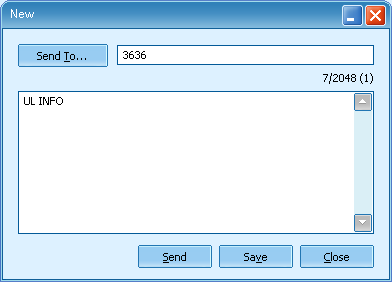
Mengecek Sisa Fair Use Packet Telkomsel Flash Unlimited Bulanan adalah satu cara terbaik untuk penghematan pengguanaan Quota, apalagi jika kita ingin berhemat dan selalu dalam range Quota dan kecepatan yang diperoleh bagus.

Caranya adalah dengan menggunakan perintah
UL
< spasi > INFO

dan mengirimkannya ke 3636 dari kartu Telkomsel Flash anda.

Jika menggunakan Modem tentunya lebih mudah lagi.
1. Buka Software Modem yang terkait SMS / Message

Sisa Fair Use, Packet Telkomsel Flash, Unlimited Bulanan, SMS Modem Huawei E220
2. New Message and Send
Sisa Fair Use, Packet Telkomsel Flash, Unlimited Bulanan, SMS Modem Huawei E220
3. View
Sisa Fair Use, Packet Telkomsel Flash, Unlimited Bulanan, SMS Modem Huawei E220

Sisa Fair Use, Packet Telkomsel Flash, Unlimited Bulanan, SMS Modem Huawei E220

Friday, August 14, 2009

Tolak ukur ranking website universitas

Berbagai upaya untuk meningkatkan ranking website ternyata tidak hanya dilakukan dalam dunia komersial. Universitas sebagai institusi pendidikan juga bersaing dalam pe-rankingan website. Organisasi yang bergerak dalam bidang Ranking website universitas adalah WEBOMETRICS.INFO.

Usaha usaha yang dilakukan Universitas-universitas dalam peningkatan ranking ini diantaranya terkait size (total ukuran fisik website), visibility (akses), rich file (keanekaragaman file) dan scholarship (banyaknya beasiswa yang ditawarkan).

Keempat kriteria ini memiliki nilai masing-masing dan mempengaruhi perankingan website universitas. Indonesia perlu berbangga karena beberapa universitas unggulan masuk dalam top 4000 berhubung banyaknya universitas yang diranking seluruhnya berjumlah 17000 universitas. Bahkan UGM dan ITB ada di peringkat 572 dan 727. Terus maju perkembangan website pendidikan Indonesia !!!

List Ranking Webometrics Universitas di Indonesia

Ranking Webometrics Universitas - Universitas di Indonesia

POSITION
WORLD RANKUNIVERSITY SIZE VISIBILITY RICH FILES SCHOLAR


Friday, July 24, 2009

How to Get our Laptop Make Adress / Phisycal Adress

Laptop Make Adress is unique Serial Number Provide by Laptop Fabric to identify every Laptop. Usually Make Adress is use in enrollment of Wireless Fidelity access to the Laptop.

Be Sure you note the Make Adress to easy the enrollment steps. You will no need to activate your Laptop when Administrator ask the Make Adress.

How we know the Laptop Make Adress Serial Number..?
1. Click Start-->Run
2. Type cmd
Windows Run
3. Type ipconfig /all
Laptop Make Adress Phisycal Address

Tuesday, July 14, 2009

Firewall Windows Block Port 80

If Linux web browser cannot connect to Windows Web Server, there maybe something wrong with windows firewall configuration. The firewall block http port, Port 80.

Check your Windows Firewall configuration from Start --> Control Panel --> Windows Firewall.


If Windows Firewall status is On, it will cause Network Timeout to do a web browsing activity to another computer like 2 images below.


Set Windows Firewall status to Off is the way to make browsing to another computer web server can be done. But remember set Windows Firewall status to Off is will make your computer more vulnerable.


Bend Effect in Nero Cover Designer

Nero Cover Designer is great tools to make CD or DVD Covers. Below is simple tutorial to make a bend effect of Font in CD or DVD. To make it easy to understand, Please look at the result in Figure 1 below.

Figure 1.

How can we make bend effect of the Font in Nero Cover Designer?. Just right click font on workspace then Bend! It will bend automatically. We Just need to configure the position.


Figure 2. Bend.

That's All and Finish.


Monday, June 29, 2009

Game Online In Facebook

Many game online in facebook like Pet Society, Who is the biggest brain, Golf, Word Challenge, Geo Challenge and Bowling. I like Who is the biggest brain better than the other's because it can be use for preparing a Psikotest.


Addthis Online Bookmarking

Social Bookmarking is Important to Improve our Blog Reader Quantity and Search Engine Optimation


how we can do that..? In this Link you can get the Step by Step.


Sunday, June 21, 2009

Bing Search Engine Baru dari Microsoft

Microsoft sebagai salah satu raksasa dunia Software kini telah meluncurkan Search Engine baru mereka yaitu bing. Search engine ini diperkirakan akan menyaingi Google dalam persaingan Search Engine. bing menggantikan MSN dan Live Search yang kalah dalam persaingan Search Engine.


Google sebagai raja search engine sepertinya sulit untuk dikalahkan karena dominasinya sebagai search engine no.1 di dunia. Seberapa banyak akses orang dapat diketahui dari alexa.com. Untuk peringkat 1 ditempati Google dan tempat kedua ditempati Yahoo.

Akankah bing mampu menggantikan Yahoo dan Google..? kita lihat perkembangannya..!!!


Thursday, June 18, 2009

Ensures your Internet Connection using Command Prompt

If you have Internet Connection, Some connection trouble maybe an usual thing (Disconnected or Request Time Out). With Ping You can ensure connection to another computer. I have practiced that with Ping another Computer our connection is ensure to always connect. Because Ping always waiting for remote site answer's, Beside the connection will be faster.

I have try it and can compare the connection using Ping and not using Ping. I feel a more better Internet access if we Using Ping Command. If we using Ping, the long time disconected can be avoid.

This Especially good if we use computer together with another user in Lab, Library or Public kind of Internet Services. Our computer with Ping Command will be ensure to allways get bandwidth and internet acces because Ping Command always send request and waiting for it's repplies.

The command is completely simple and all of people study computer know about this..

just type in cmd (Windows command line or Linux terminal)

ping [domain name] -t

example ping www.indosatm2.com -t

a little value of time and TTL mean a better speed and access. In my example picture's below mean a bad connection. A good connection usually have time value 200 to 500 mS, but my connection value is about 2 Second. That was a bad connection...!!! Poor Me..!!. A Request Time Out mean a trouble in connection, but if you let this window open, it will try to always connect to the Internet. While another people that doesn't let this window open have a less opportunity to allways connect to Internet.


Now you can feel a better connection than other people who doesn't use this command. Feel always connect in public Internet place more than another person's

Thursday, June 4, 2009

Turn Off Windows Autoplay Reduce The Risk Of Infected by Viruses

Have you ever insert Flash Drive and suddenly your computer infected by viruses?
This can be happen if our autoplay configuration not set to disable.

If we disable our Autoplay, our computer will probably safer from viruses.
The autorun file in the plug and play drive (Autorun.inf or autorun.ini) can't be work if we turn off autoplay in all drives.
So The Virus that usually came with autorun can't directy infected our computer.


below is step by step to turn off autoplay in GPEDIT.MSC

1.Start Run and then Type gpedit.msc --> Edit Group Policy in Windows


2.Double Click The Administrative Template On User Configuration, then click System


3.Double Click Turn Off Autoplay


4.Click enable radio button and then Turn off Autoplay in All Drive (choose in combo box)


5.Apply the Changes and OK.

Do The same way in Computer Configuration beside User Configuration !!! Turn Off Autoplay from here too.


Note that this manner work in windows XP proffessional only. You can't do this in Windows XP Home Edition.


Sunday, May 31, 2009

Internet services and port numbers

The TCP/IP protocol suite is the lingua franca of the Internet because the Internet services “speak” TCP/IP. These services make the Internet tick by making possible the transfer of mail, news, and Web pages. Each Internet service has its own protocol that relies on TCP/IP for the actual transfer of the information. Each service also has one or more assigned port numbers
that it uses to do whatever it’s designed to do. Here are some well-known Internet services and their associated protocols:
  1. DHCP (Dynamic Host Configuration Protocol) is for dynamically configuring TCP/IP network parameters on a computer. DHCP is primarily used to assign dynamic IP addresses and other networking information such as name server, default gateway, domain names that are needed to configure TCP/IP networks. The DHCP server listens on port 67.
  2. FTP (File Transfer Protocol) is used to transfer files between computers on the Internet. FTP uses two ports — data is transferred on port 20; control information is exchanged on port 21.
  3. HTTP (HyperText Transfer Protocol) is for sending documents from one system to another. HTTP is the underlying protocol of the Web. By default, the Web server and client communicate on port 80.
  4. SMTP (Simple Mail Transfer Protocol) is for exchanging e-mail messages between systems. SMTP uses port 25 for information exchange.
  5. NNTP (Network News Transfer Protocol) is for distribution of news articles in a store-and-forward fashion across the Internet. NNTP uses port 119.
  6. SSH (Secure Shell) is a protocol for secure remote login and other secure network services over an insecure network. SSH uses port 22.
  7. TELNET enables a user on one system to log in to another system on the Internet (the user must provide a valid user ID and password to log in to the remote system).
  8. TELNET uses port 23 by default. However, the TELNET client can connect to any specified port.
  9. NFS (Network File System) is for sharing files among computers. NFS uses Sun’s Remote Procedure Call (RPC) facility, which exchanges information through port 111.
  10. NTP (Network Time Protocol) is used by client computers to synchronize the system time with that on a server (one with a more accurate clock). NTP uses port 123.
  11. SNMP (Simple Network Management Protocol) is for managing all types of network devices on the Internet. Like FTP, SNMP uses two ports: 161 and 162.
  12. TFTP (Trivial File Transfer Protocol) is for transferring files from one system to another (typically used by X terminals and diskless workstations to download boot files from another host on the network). TFTP data transfer takes place on port 69.

Friday, May 22, 2009

Video Formats

VCD -
VCD is an mpeg1 based format, with a constant bitrate of 1150kbit at a resolution of 352x240 (NTCS). VCDs are generally used for lower quality transfers (CAM/TS/TC/Screener(VHS)/TVrip(analogue) in order to make smaller file sizes, and fit as much on a single disc as possible. Both VCDs and SVCDs are timed in minutes, rather than MB, so when looking at an mpeg, it may appear larger than the disc capacity, and in reality u can fit 74min on a CDR74.


SVCD -
SVCD is an mpeg2 based (same as DVD) which allows variable bit-rates of up to 2500kbits at a resolution of 480x480 (NTSC) which is then decompressed into a 4:3 aspect ratio when played back. Due to the variable bit-rate, the length you can fit on a single CDR is not fixed, but generally between 35-60 Mins are the most common. To get a better SVCD encode using variable bit-rates, it is important to use multiple "passes". this takes a lot longer, but the results are far clearer.


XVCD/XSVCD -
These are basically VCD/SVCD that don't obey the "rules". They are both capable of much higher resolutions and bit-rates, but it all depends on the player to whether the disc can be played. X(S)VCD are total non-standards, and are usually for home-ripping by people who don't intend to release them.


KVCD
KVCD is a modification to the standard MPEG-1 and MPEG-2 GOP structure and Quantization Matrix. It enables you to create over 120 minutes of near DVD quality video, depending on your material, on a single 80 minute CD-R/CD-RW. We have published these specifications as KVCDx3, our official resolution, which produce 528x480 (NTSC) and 528x576 (PAL) MPEG-1 variable bit rate video, from 64Kbps to 3,000Kbps. Using a resolution of 352x240 (NTSC) or 352x288 (PAL), it's possible to encode video up to ~360 minutes of near VCD quality on a single 80 minute CD-R. The mpeg files created will play back in most modern standalone DVD players. You must burn the KVCD MPEG files as non-standard VCD or non-standard SVCD (depends on your player) with Nero or VCDEasy.


DivX / XviD -
DivX is a format designed for multimedia platforms. It uses two codecs, one low motion, one high motion. most older films were encoded in low motion only, and they have problems with high motion too. A method known as SBC (Smart Bit-rate Control) was developed which switches codecs at the encoding stage, making a much better print. The format is Ana orphic and the bit-rate/resolution are interchangeable. Due to the higher processing power required, and the different codecs for playback, its unlikely we'll see a DVD player capable of play DivX for quite a while, if at all. There have been players in development which are supposedly capable, but nothing has ever arisen. The majority of PROPER DivX rips (not Re-Encs) are taken from DVDs, and generally up to 2hours in good quality is possible per disc. Various codecs exist, most popular being the original Divx3.11a and the new XviD codecs.


CVD -
CVD is a combination of VCD and SVCD formats, and is generally supported by a majority of DVD players. It supports MPEG2 bit-rates of SVCD, but uses a resolution of 352x480(ntsc) as the horizontal resolution is generally less important. Currently no groups release in CVD.


DVD-R -
Is the recordable DVD solution that seems to be the most popular (out of DVD-RAM, DVD-R and DVD+R). it holds 4.7gb of data per side, and double sided discs are available, so discs can hold nearly 10gb in some circumstances. SVCD mpeg2 images must be converted before they can be burnt to DVD-R and played successfully. DVD>DVDR copies are possible, but sometimes extras/languages have to be removed to stick within the available 4.7gb.


MiniDVD -
MiniDVD/cDVD is the same format as DVD but on a standard CDR/CDRW. Because of the high resolution/bit-rates, its only possible to fit about 18-21 mins of footage per disc, and the format is only compatible with a few players.

Original Source Movie Tags

CAM
A cam is a theater rip usually done with a digital video camera. A mini tripod is sometimes used, but a lot of the time this wont be possible, so the camera make shake. Also seating placement isn't always idle, and it might be filmed from an angle. If cropped properly, this is hard to tell unless there's text on the screen, but a lot of times these are left with triangular borders on the top and bottom of the screen. Sound is taken from the onboard microphone of the camera, and especially in comedies, laughter can often be heard during the film. Due to these factors picture and sound quality are usually quite poor, but sometimes we're lucky, and the theater will be fairly empty and a fairly clear signal will be heard.


TELESYNC (TS)
A telesync is the same spec as a CAM except it uses an external audio source (most likely an audio jack in the chair for hard of hearing people). A direct audio source does not ensure a good quality audio source, as a lot of background noise can interfere. A lot of the times a telesync is filmed in an empty cinema or from the projection booth with a professional camera, giving a better picture quality. Quality ranges drastically, check the sample before downloading the full release. A high percentage of Telesyncs are CAMs that have been mislabeled.


TELECINE (TC)
A telecine machine copies the film digitally from the reels. Sound and picture should be very good, but due to the equipment involved and cost telecines are fairly uncommon. Generally the film will be in correct aspect ratio, although 4:3 telecines have existed. A great example is the JURASSIC PARK 3 TC done last year. TC should not be confused with TimeCode , which is a visible counter on screen throughout the film.


SCREENER (SCR)
A pre VHS tape, sent to rental stores, and various other places for promotional use. A screener is supplied on a VHS tape, and is usually in a 4:3 (full screen) a/r, although letterboxed screeners are sometimes found. The main draw back is a "ticker" (a message that scrolls past at the bottom of the screen, with the copyright and anti-copy telephone number). Also, if the tape contains any serial numbers, or any other markings that could lead to the source of the tape, these will have to be blocked, usually with a black mark over the section. This is sometimes only for a few seconds, but unfortunately on some copies this will last for the entire film, and some can be quite big. Depending on the equipment used, screener quality can range from excellent if done from a MASTER copy, to very poor if done on an old VHS recorder thru poor capture equipment on a copied tape. Most screeners are transferred to VCD, but a few attempts at SVCD have occurred, some looking better than others.


DVD-SCREENER (DVDscr)
Same premise as a screener, but transferred off a DVD. Usually letterbox , but without the extras that a DVD retail would contain. The ticker is not usually in the black bars, and will disrupt the viewing. If the ripper has any skill, a DVDscr should be very good. Usually transferred to SVCD or DivX/XviD.


DVDRip
A copy of the final released DVD. If possible this is released PRE retail (for example, Star Wars episode 2) again, should be excellent quality. DVDrips are released in SVCD and DivX/XviD.


VHSRip
Transferred off a retail VHS, mainly skating/sports videos and XXX releases.


TVRip
TV episode that is either from Network (capped using digital cable/satellite boxes are preferable) or PRE-AIR from satellite feeds sending the program around to networks a few days earlier (do not contain "dogs" but sometimes have flickers etc) Some programs such as WWF Raw Is War contain extra parts, and the "dark matches" and camera/commentary tests are included on the rips. PDTV is capped from a digital TV PCI card, generally giving the best results, and groups tend to release in SVCD for these. VCD/SVCD/DivX/XviD rips are all supported by the TV scene.


WORKPRINT (WP)
A workprint is a copy of the film that has not been finished. It can be missing scenes, music, and quality can range from excellent to very poor. Some WPs are very different from the final print (Men In Black is missing all the aliens, and has actors in their places) and others can contain extra scenes (Jay and Silent Bob) . WPs can be nice additions to the collection once a good quality final has been obtained.


DivX Re-Enc -A DivX re-enc is a film that has been taken from its original VCD source, and re-encoded into a small DivX file. Most commonly found on file sharers, these are usually labeled something like Film.Name.Group(1of2) etc. Common groups are SMR and TND. These aren't really worth downloading, unless you're that unsure about a film u only want a 200mb copy of it. Generally avoid.


Watermarks
A lot of films come from Asian Silvers/PDVD (see below) and these are tagged by the people responsible. Usually with a letter/initials or a little logo, generally in one of the corners. Most famous are the "Z" "A" and "Globe" watermarks.


Asian Silvers / PDVD
These are films put out by eastern bootleggers, and these are usually bought by some groups to put out as their own. Silvers are very cheap and easily available in a lot of countries, and its easy to put out a release, which is why there are so many in the scene at the moment, mainly from smaller groups who don't last more than a few releases. PDVDs are the same thing pressed onto a DVD. They have removable subtitles, and the quality is usually better than the silvers. These are ripped like a normal DVD, but usually released as VCD.

 
Design by Free WordPress Themes | Bloggerized by Lasantha - Premium Blogger Themes | Sweet Tomatoes Printable Coupons